
250 lines
14 KiB
Markdown
250 lines
14 KiB
Markdown
Dạo gần đây các bạn đã biết đến bài hướng dẫn của bạn Tín bên Kênh Táy máy về việc DYI Loa thông minh Google Assistant tiếng Việt bằng Orange Pi Zero và bo mở rộng. Link bài viết [https://hs2t.com/blog/loa-google-assistant-tieng-viet/](https://hs2t.com/blog/loa-google-assistant-tieng-viet/)
|
||
|
||
Trên thực tế, trước đây Orange Pi Việt Nam cũng đã hướng dẫn các bạn sử dụng Orange PI Zero như Google Assistant trong bài viết này [http://orangepi.vn/bien-orange-pi-zero-thanh-google-assistant.html](https://orangepi.vn/bien-orange-pi-zero-thanh-google-assistant.html). Tuy nhiên chưa tạo thành file ảnh img sẵn như bên Kênh Táy máy, nên ít người ủng hộ. Có lẽ việc tạo file ảnh sẵn sẽ được nhiều người thích hơn vì đỡ phải làm gì 🙂 Orange PI Việt Nam sẽ rút kinh nghiệm
|
||
|
||

|
||
|
||
Ngoài ra, việc in vỏ 3D và hàn loa cũng khá phức tạp nên Orange Pi Việt Nam gợi ý bạn 1 combo sản phẩm Orange PI Zero, Bo mở rộng Ext, vỏ đen cho ext và 1 bộ loa siêu rẻ [LF-809](https://shopee.vn/product/37995875/2118632745/) hoặc [LF-807](https://shopee.vn/product/37995875/3273618123/) là được (ảnh minh họa). Link sản phẩm này đều có trên shopee
|
||
|
||
- Bo mở rộng: [https://shopee.vn/product/37995875/1471377902/](https://shopee.vn/product/37995875/1471377902/)
|
||
- Vỏ đen lắp ext: [https://shopee.vn/product/37995875/1471377918/](https://shopee.vn/product/37995875/1471377918/)
|
||
- Loa LF-807: [https://shopee.vn/product/37995875/3273618123/](https://shopee.vn/product/37995875/3273618123/)
|
||
- Loa LF-890F: [https://shopee.vn/product/37995875/2118632745/](https://shopee.vn/product/37995875/2118632745/)
|
||
|
||
Theo cập nhật mới nhất, từ ngày 1/1/2021 trang snowboy tạo hotword đã đóng lại và theo như hướng dẫn thì bạn sẽ không tạo ra được hotword riêng của mình nữa. Do đó mình xin hướng dẫn các bạn tạo hotword ngay trên máy tính cá nhân một cách dễ dàng.
|
||
|
||
Đầu tiên các bạn cần máy PC đang chạy tốt, chạy Win cũng được, Linux thì quá hay. Nhưng vì WIN phổ thông hơn nên mình sẽ hướng dẫn các bạn cài trên Win. Để cài trên Win hay Linux, các bạn cần cài bản Ubuntu 16.04 (chính xác là bản 16.04 vì mình có thử qua các bản 18.04 hoặc 20.04 đều không được)
|
||
|
||
Trước tiên, hãy mở PowerShell trên Windows, bấm **Start**, tìm **PowerShell**, bấm chuột phải và chọn **Run as administrator**
|
||
|
||
Tiếp sau đó gõ câu lệnh này
|
||
|
||
> **_Enable-WindowsOptionalFeature -Online -FeatureName Microsoft-Windows-Subsystem-Linux_**
|
||
|
||
câu lệnh này là để cho phép cài Linux subsystem, bấm Y khi được hỏi và Enter.
|
||
|
||
Quay về ổ C, tải bản Ubuntu 16.04 về bằng câu lệnh
|
||
|
||
> _**Invoke-WebRequest -Uri https://wsldownload.azureedge.net/Ubuntu\_1604.2019.523.0\_x64.appx -OutFile Ubuntu.appx -UseBasicParsing**_
|
||
|
||
|
||
|
||
Sau khi tải xong, trên ổ C sẽ có 1 file tên là **Ubuntu\_1604.2019.523.0\_x64.appx,** ok hãy gõ lệnh
|
||
|
||
> _**Add-AppxPackage .\\Ubuntu\_1604.2019.523.0\_x64.appx**_
|
||
|
||
Như vậy là việc cài đã xong xuôi.
|
||
|
||
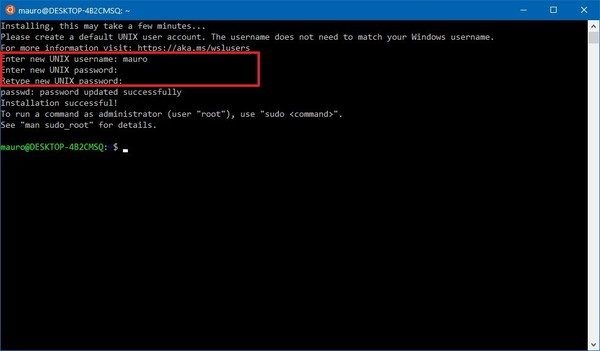
Quay về Windows, bấm Start và chọn bản Linux vừa cài, sẽ mất 1 thời gian cho hệ thống chạy, sau đó chọn username, password là bạn đã có 1 bản Ubuntu 16.04 chạy ngay trên nền Windows.
|
||
|
||
Phần tiếp theo là cài các phần mềm cần thiết
|
||
|
||
> _**sudo apt-get update && sudo apt-get upgrade -y**_
|
||
>
|
||
> _**sudo apt-get install python-pyaudio python3-pyaudio sox**_
|
||
>
|
||
> _**sudo apt-get install virtualenv**_
|
||
|
||
Tiếp đến là clone thư mục này về
|
||
|
||
> **_git clone https://github.com/seasalt-ai/snowboy_**
|
||
>
|
||
> **_cd snowboy_**
|
||
|
||
Sau đó là chạy môi trường ảo python
|
||
|
||
> **_virtualenv -p python2 venv/snowboy_**
|
||
>
|
||
> **_source venv/snowboy/bin/activate_**
|
||
>
|
||
> **_cd examples/Python_**
|
||
|
||
cài các thư viện cần thiết qua pip
|
||
|
||
> **_pip install pyaudio_**
|
||
>
|
||
> **_pip install numpy scipy pandas sympy nose_**
|
||
|
||
nếu pip yêu cầu nâng cấp, hãy nâng cấp như yêu cầu qua lệnh **_pip install –upgrade pip._** Tạm thời WSL dùng đến đây.
|
||
|
||
Giờ là lúc cần ghi âm và tạo hotword, như hướng dẫn, bạn cần một môi trường yên tĩnh, sử dụng đúng combo Orange Pi Zero và Ext đó, sau khi SSH vào như hướng dẫn, chạy các lệnh sau để ghi âm
|
||
|
||
> **_rec -r 16000 -c 1 -b 16 -e signed-integer -t wav record1.wav_**
|
||
>
|
||
> **_rec -r 16000 -c 1 -b 16 -e signed-integer -t wav record2.wav_**
|
||
>
|
||
> **_rec -r 16000 -c 1 -b 16 -e signed-integer -t wav record3.wav_**
|
||
|
||
Mỗi 1 lệnh chạy xong sẽ ghi âm 1 lần hotword của bạn, bấm Cltr+C để thoát khi ghi xong. Sau đó bạn copy 3 file wav đó về máy tính của bạn qua lệnh scp
|
||
|
||
> _**scp root@192.168.1.x:/root/record\*.wav C:\**_
|
||
|
||
Kiểm tra xem 3 files wav trên đã có trên ổ C chưa. Quay trở lại Linux trên Windows (WSL). Copy các file wave vào thư mục cần tạo hotword. Ổ C:\ của bạn trên WSL được mặc định sẽ là /mnt/c
|
||
|
||
> _**cp /mnt/c/record\*.wav ~/snowboy/examples/Python**_
|
||
|
||
Khi đó trên thư mục (venv) ~/snowboy/examples/Python sẽ có 3 file wave kia.
|
||
|
||
Chạy nốt câu lệnh này sẽ tạo ra file hotwork.pmdl của bạn
|
||
|
||
> **_python generate\_pmdl.py -r1=record1.wav -r2=record2.wav -r3=record3.wav -lang=en -n=hotword.pmdl_**
|
||
|
||
Sau khi có được file hotword.pmdl của bạn, copy nó vào Pi đã cài như hướng dẫn của Kênh táy máy. Chúc các bạn thành công.
|
||
|
||
Video minh họa
|
||
|
||
Lắp đặt Orange Pi Zero làm Google Assistant và tự tạo hotword trên PC - YouTube
|
||
|
||
Tap to unmute
|
||
|
||
[Lắp đặt Orange Pi Zero làm Google Assistant và tự tạo hotword trên PC](https://www.youtube.com/watch?v=stLkMXglHYM) [Orange Pi Vietnam](https://www.youtube.com/channel/UCl0lVmXFHAhZybuOIzu2CaA)
|
||
|
||

|
||
|
||
Orange Pi Vietnam1.83K subscribers
|
||
|
||
[Watch on](https://www.youtube.com/watch?v=stLkMXglHYM)
|
||
|
||
[Chia sẻ trên WhatsApp](whatsapp://send?text=Train%20hotword%20cho%20Loa%20th%C3%B4ng%20minh%20Google%20Assistant%20ti%E1%BA%BFng%20Vi%E1%BB%87t%20b%E1%BA%B1ng%20PC%20-%20https://orangepi.vn/train-hotword-cho-loa-thong-minh-google-assistant-tieng-viet-bang-pc.html "Chia sẻ trên WhatsApp")[Chia sẻ trên Facebook](https://www.facebook.com/sharer.php?u=https://orangepi.vn/train-hotword-cho-loa-thong-minh-google-assistant-tieng-viet-bang-pc.html "Chia sẻ trên Facebook")[Chia sẻ trên Twitter](https://twitter.com/share?url=https://orangepi.vn/train-hotword-cho-loa-thong-minh-google-assistant-tieng-viet-bang-pc.html "Chia sẻ trên Twitter")[Gửi email cho bạn bè](mailto:?subject=Train%20hotword%20cho%20Loa%20th%C3%B4ng%20minh%20Google%20Assistant%20ti%E1%BA%BFng%20Vi%E1%BB%87t%20b%E1%BA%B1ng%20PC&body=Xem%20n%C3%A0y%3A%20https%3A%2F%2Forangepi.vn%2Ftrain-hotword-cho-loa-thong-minh-google-assistant-tieng-viet-bang-pc.html "Gửi email cho bạn bè")[Ghim trên Pinterest](https://pinterest.com/pin/create/button?url=https://orangepi.vn/train-hotword-cho-loa-thong-minh-google-assistant-tieng-viet-bang-pc.html&media=https://orangepi.vn/wp-content/uploads/2021/01/combo-1067x800.jpg&description=Train%20hotword%20cho%20Loa%20th%C3%B4ng%20minh%20Google%20Assistant%20ti%E1%BA%BFng%20Vi%E1%BB%87t%20b%E1%BA%B1ng%20PC "Ghim trên Pinterest")[Chia sẻ trên LinkedIn](https://www.linkedin.com/shareArticle?mini=true&url=https://orangepi.vn/train-hotword-cho-loa-thong-minh-google-assistant-tieng-viet-bang-pc.html&title=Train%20hotword%20cho%20Loa%20th%C3%B4ng%20minh%20Google%20Assistant%20ti%E1%BA%BFng%20Vi%E1%BB%87t%20b%E1%BA%B1ng%20PC "Chia sẻ trên LinkedIn")
|
||
|
||

|
||
|
||
##### superadmin
|
||
|
||
### 2 bình luận về “Train hotword cho Loa thông minh Google Assistant tiếng Việt bằng PC”
|
||
|
||
1. 
|
||
|
||
|
||
fulicho biết:
|
||
|
||
|
||
(cho mình hỏi đây là lỗi gì ạ . mình làm đến đoạn ghi âm thi không được ?
|
||
|
||
|
||
snowboy) fuli@DESKTOP-TCTTFEA:~$ rec -r 16000 -c 1 -b 16 -e signed-integer -t wav record1.wav
|
||
|
||
|
||
ALSA lib confmisc.c:768:(parse\_card) cannot find card ‘0’
|
||
|
||
|
||
ALSA lib conf.c:4292:(\_snd\_config\_evaluate) function snd\_func\_card\_driver returned error: No such file or directory
|
||
|
||
|
||
ALSA lib confmisc.c:392:(snd\_func\_concat) error evaluating strings
|
||
|
||
|
||
ALSA lib conf.c:4292:(\_snd\_config\_evaluate) function snd\_func\_concat returned error: No such file or directory
|
||
|
||
|
||
ALSA lib confmisc.c:1251:(snd\_func\_refer) error evaluating name
|
||
|
||
|
||
ALSA lib conf.c:4292:(\_snd\_config\_evaluate) function snd\_func\_refer returned error: No such file or directory
|
||
|
||
|
||
ALSA lib conf.c:4771:(snd\_config\_expand) Evaluate error: No such file or directory
|
||
|
||
|
||
ALSA lib pcm.c:2266:(snd\_pcm\_open\_noupdate) Unknown PCM default
|
||
|
||
|
||
rec FAIL formats: can’t open input \`default’: snd\_pcm\_open error: No such file or directory
|
||
|
||
|
||
[15 Tháng 1, 2021 lúc 10:08 chiều](https://orangepi.vn/train-hotword-cho-loa-thong-minh-google-assistant-tieng-viet-bang-pc.html#comment-37)
|
||
|
||
[Trả lời](https://orangepi.vn/train-hotword-cho-loa-thong-minh-google-assistant-tieng-viet-bang-pc.html#comment-37)
|
||
|
||
|
||
- 
|
||
|
||
|
||
Tran Tancho biết:
|
||
|
||
|
||
Lệnh rec này bạn phải chạy trên Orange PI Zero và ext bạn nhé, ko phải chạy trên PC
|
||
|
||
|
||
[20 Tháng 1, 2021 lúc 1:05 chiều](https://orangepi.vn/train-hotword-cho-loa-thong-minh-google-assistant-tieng-viet-bang-pc.html#comment-38)
|
||
|
||
[Trả lời](https://orangepi.vn/train-hotword-cho-loa-thong-minh-google-assistant-tieng-viet-bang-pc.html#comment-38)
|
||
|
||
### Để lại một bình luận [Hủy](https://orangepi.vn/train-hotword-cho-loa-thong-minh-google-assistant-tieng-viet-bang-pc.html\#respond)
|
||
|
||
Email của bạn sẽ không được hiển thị công khai.Các trường bắt buộc được đánh dấu \*
|
||
|
||
Bình luận \*
|
||
|
||
Tên \*
|
||
|
||
Email \*
|
||
|
||
Trang web
|
||
|
||
Δ
|
||
|
||
- Tìm kiếm:
|
||
|
||
- [Orange Pi Việt Nam](https://orangepi.vn/)
|
||
- [Giới thiệu về máy tính nhúng](https://orangepi.vn/gioi-thieu-ve-may-tinh-nhung)
|
||
- [Hướng dẫn đặt hàng](https://orangepi.vn/dat-hang-tai-orange-pi-viet-nam)
|
||
- [Chính sách Bảo hành](https://orangepi.vn/chinh-sach-ban-hang-va-bao-hanh)
|
||
- [Thư ủy quyền phân phối tại Việt Nam](https://orangepi.vn/thu-uy-quyen-phan-phoi-tai-viet-nam)
|
||
- [Chính sách bảo mật](https://orangepi.vn/chinh-sach-bao-mat)
|
||
- [Liên hệ](https://orangepi.vn/lien-he)
|
||
- [Shop](https://orangepi.vn/shop)
|
||
- [Bo Mạch Orange Pi](https://orangepi.vn/danh-muc-san-pham/bo-mach-orange-pi)
|
||
- [Chip H3](https://orangepi.vn/tu-khoa-san-pham/chip-h3)
|
||
- [Chip H6](https://orangepi.vn/tu-khoa-san-pham/chip-h6)
|
||
- [RK3399](https://orangepi.vn/tu-khoa-san-pham/chip-rk3399)
|
||
- [RK3588, RK3566](https://orangepi.vn/tu-khoa-san-pham/rk3588)
|
||
- [Chip H616, H618](https://orangepi.vn/tu-khoa-san-pham/chip-h616)
|
||
- [Allwinner A733](https://orangepi.vn/tu-khoa-san-pham/allwinner-a733)
|
||
- [RAM 1GB](https://orangepi.vn/tu-khoa-san-pham/ram-1gb)
|
||
- [RAM 2GB](https://orangepi.vn/tu-khoa-san-pham/ram-2gb)
|
||
- [RAM 4GB](https://orangepi.vn/tu-khoa-san-pham/ram-4gb)
|
||
- [RAM 6GB](https://orangepi.vn/tu-khoa-san-pham/ram-6gb)
|
||
- [RAM 8GB](https://orangepi.vn/tu-khoa-san-pham/ram8gb)
|
||
- [Phụ kiện Orange Pi](https://orangepi.vn/danh-muc-san-pham/phu-kien-orange-pi)
|
||
- [Màn hình](https://orangepi.vn/tu-khoa-san-pham/man-hinh)
|
||
- [Vỏ Mica lắp ghép](https://orangepi.vn/tu-khoa-san-pham/vo-mica)
|
||
- [Vỏ thép kiêm tản nhiệt](https://orangepi.vn/tu-khoa-san-pham/vo-thep)
|
||
- [Vỏ nhôm nhẹ tản nhiệt tốt](https://orangepi.vn/tu-khoa-san-pham/vo-nhom)
|
||
- [Nguồn Orange Pi](https://orangepi.vn/tu-khoa-san-pham/nguon-orange-pi)
|
||
- [Thẻ nhớ microSD](https://orangepi.vn/tu-khoa-san-pham/the-nho-microsd)
|
||
- [Compute Module](https://orangepi.vn/tu-khoa-san-pham/compute-module)
|
||
- [Blog](https://orangepi.vn/blog)
|
||
- [Giới thiệu](https://orangepi.vn/category/gioi-thieu)
|
||
- [Hướng dẫn](https://orangepi.vn/category/huong-dan)
|
||
- [Trình diễn](https://orangepi.vn/category/trinh-dien)
|
||
- [Đăng nhập](https://orangepi.vn/my-account "Đăng nhập")
|
||
- [**Hotline: 0923449899**](tel:0923449899)
|
||
|
||
Bạn cần trợ giúp?
|
||
|
||
[Messenger](https://m.me/orangepivietnam "Messenger") [Zalo Official Account](https://oa.zalo.me/1687181280533723118 "Zalo Official Account") [Telegram](https://t.me/maytinhnhung "Telegram") [Whatsapp](https://api.whatsapp.com/send?phone=84923449899 "Whatsapp")
|
||
|
||

|
||
|
||
Orange Pi Việt NamNhà phân phối chính thức
|
||
|
||
Xin chào! 👋🏼👋🏼👋🏼 Tôi có thể giúp gì được bạn?
|
||
|
||
- [Hotline](tel:0923449899 "Hotline")
|
||
- [Facebook](https://www.facebook.com/orangepivietnam "Facebook")
|
||
- [Zalo](https://oa.zalo.me/1687181280533723118 "Zalo")
|
||
|
||
## Đăng nhập
|
||
|
||
Sign In - Google Accounts
|
||
|
||
Continue with GoogleContinue with Google. Opens in new tab
|
||
|
||
Tên tài khoản hoặc địa chỉ email \*Bắt buộc
|
||
|
||
Mật khẩu \*Bắt buộc
|
||
|
||
Ghi nhớ mật khẩuĐăng nhập
|
||
|
||
[Quên mật khẩu?](https://orangepi.vn/my-account/lost-password) |