
171 lines
12 KiB
Markdown
171 lines
12 KiB
Markdown
Xin chào các bạn, Orange Pi 5 Plus quả là một máy tính nhúng mạnh mẽ, hơn nữa lại còn được hỗ trợ bởi nhiều hệ điều hành khác nhau, trong đó bản porting Centos này cực kỳ tuyệt vời. Như đã giới thiệu trước đây tại [Các hệ điều hành cho Orange Pi 5 Plus](https://orangepi.vn/cac-he-dieu-hanh-cho-orange-pi-5-plus.html), chúng ta có thể tải về bản Centos 7 GNOME Desktop tại github này [https://github.com/leeboby/centos-images](https://github.com/leeboby/centos-images). Tại đó cũng có bản Minimal là CLI nhưng vì tôi sẽ hướng dẫn thêm cài RDP để remote từ xa và aaPanel để quản lý Web service nên tôi sẽ dùng bản GNOME Desktop.
|
||
|
||
> [Các hệ điều hành cho Orange Pi 5 Plus](https://orangepi.vn/cac-he-dieu-hanh-cho-orange-pi-5-plus.html)
|
||
|
||
Các hệ điều hành cho Orange Pi 5 Plus - Orange Pi Viet Nam
|
||
|
||
[Các hệ điều hành cho Orange Pi 5 Plus](https://orangepi.vn/cac-he-dieu-hanh-cho-orange-pi-5-plus.html)
|
||
|
||
[](https://orangepi.vn/cac-he-dieu-hanh-cho-orange-pi-5-plus.html)
|
||
|
||
Thực sự, sau Orange Pi 5, thì Orange Pi 5 Plus rất là đặc biệt với nhiều cái “plus” hơn hẳn và khác hơn so với một bo mạch nhúng thông thường. Thứ nhất là bo mạch khá to, to hơn các tất cả các bo mạch khác, nhưng lại gói gọn trên đó nhiều chức năng hơn rất nhiều so với các bo mạch khác.
|
||
|
||
[Orange Pi Viet Nam](https://orangepi.vn/)
|
||
|
||
[0 Bình luận](https://orangepi.vn/cac-he-dieu-hanh-cho-orange-pi-5-plus.html#respond)
|
||
|
||
- Nhúng WordPress
|
||
- Nhúng HTML
|
||
|
||
Copy và dán URL này vào trang WordPress của bạn để được nhúng vào.
|
||
|
||
Sao chép đoạn mã này vào trang web của bạn để nhúng
|
||
|
||
Đầu tiên bạn cần:
|
||
|
||
- Orange Pi 5 Plus, bản 8GB hay 16GB RAM tùy theo nhu cầu của bạn
|
||
- thẻ nhớ microSD 16GB tối thiểu, nguồn type-c 5v 3A hoặc 4A
|
||
- bạn cũng sẽ cần màn hình để thao tác, cùng với chuột và bàn phím
|
||
- có thể mua thêm vỏ mica kèm tản và quạt để Orange Pi chạy ổn định hơn
|
||
- hoặc mua thêm ổ ssd nvme 2280 để lưu trữ (nếu bạn định cài cloud storage server.
|
||
|
||
# Cài Centos 7 trên Orange Pi 5 Plus
|
||
|
||
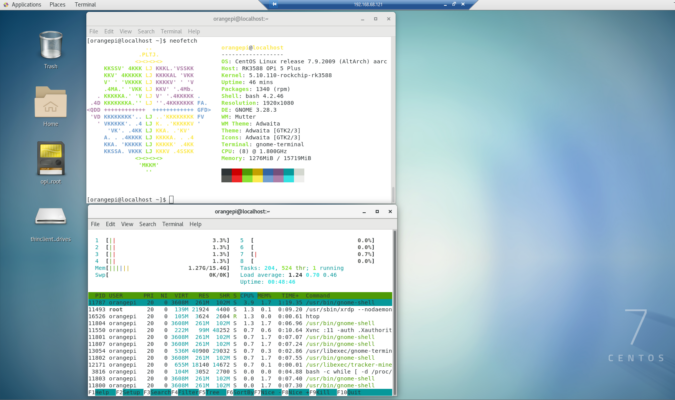
Đầu tiên bạn tải về file img của hệ điều hành, nó sẽ có tên dạng như vậy **opi5plus-centos-7.2009-aarch64-gnome-20230611.img,** sử dụng Win32DiskImager hoặc Etcher để flash nó vào thẻ nhớ trên máy tính. Bạn sẽ cần đầu đọc thẻ microSD nếu máy tính bạn chưa có. Sau đó cắm vào Orange Pi 5 Plus và cắm nguồn để khởi động, cắm dây LAN, cắm màn hình và bàn phím như một máy tính thông thường. Hệ thống sẽ khởi động các dòng lệnh và sau đó sẽ hiện lên các bảng câu hỏi để cài đặt Centos, dễ hơn cài windows rất nhiều. Sau khi hoàn thiện các bước này bạn đã có Centos 7 với desktop GNOME như hình bên dưới
|
||
|
||
[](https://orangepivn.b-cdn.net/wp-content/uploads/2023/08/orangepi5-plus-centos7.png)
|
||
|
||
# Cài XRDP để remote desktop trên Orange Pi 5 Plus
|
||
|
||
Để remote từ máy tính khác vào Pi thông qua ứng dụng Desktop Remote trên Windows, bạn cần cài đặt XDRP. Các bước cài đặt như sau:
|
||
|
||
**1\. Cập nhật hệ thống, khi chạy lệnh này sẽ mất khá lâu, lấy 1 cốc cafe trong lúc chờ**
|
||
|
||
`$ sudo yum -y update`
|
||
|
||
**2\. Cài repo và cài đặt XRDP**
|
||
|
||
`$ sudo yum install -y epel-release
|
||
|
||
$ sudo yum install -y xrdp
|
||
|
||
$ sudo systemctl enable xrdp
|
||
|
||
$ sudo systemctl start xrdp`
|
||
|
||
**3\. Mở firewall cho cổng 3389 của XRDP**
|
||
|
||
`$ sudo firewall-cmd --add-port=3389/tcp --permanent
|
||
|
||
$ sudo firewall-cmd --reload`
|
||
|
||
**4\. Kiểm tra lại xem service XRDP đã chạy chưa**
|
||
|
||
`$ sudo systemctl status xrdp`
|
||
|
||
Nếu mọi việc OK, bạn sẽ có thể sử dụng máy tính Windows để remote desktop trên Centos 7
|
||
|
||
[](https://orangepivn.b-cdn.net/wp-content/uploads/2023/08/centos-aapanel.png)
|
||
|
||
# Cài aaPanel quản lý web service.
|
||
|
||
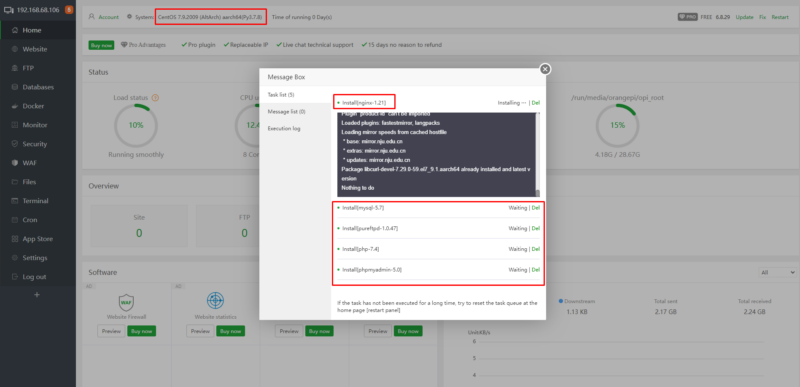
Như đã giới thiệu trước đây aaPanel là một phần mềm miễn phí rất mạnh để quản lý các webserver, trên đó bạn có thể tự động cài LAMP hoặc LNMP tùy thích. Có thể quản lý các docker hoặc ứng dụng docker, rồi sử dụng reversed proxy để mở cổng ra web service.
|
||
|
||
Bạn có thể tạo các website tĩnh, website với PHP không hoặc với cả PHP và MySQL, thậm chí còn có thể quản lý các ứng dụng NodeJS thông qua việc quản lý các phiên bản nodejs và npm ngay chính tại giao diện quản lý.
|
||
|
||
Bạn có thể xem thêm về aaPanel tại đây [Hướng dẫn cài đặt Server Management aaPanel cho Orange Pi 3 LTS hoặc Orange Pi 4 LTS](https://orangepi.vn/huong-dan-cai-dat-server-management-aapanel-cho-orange-pi-3-lts-hay-orange-pi-4-lts.html)
|
||
|
||
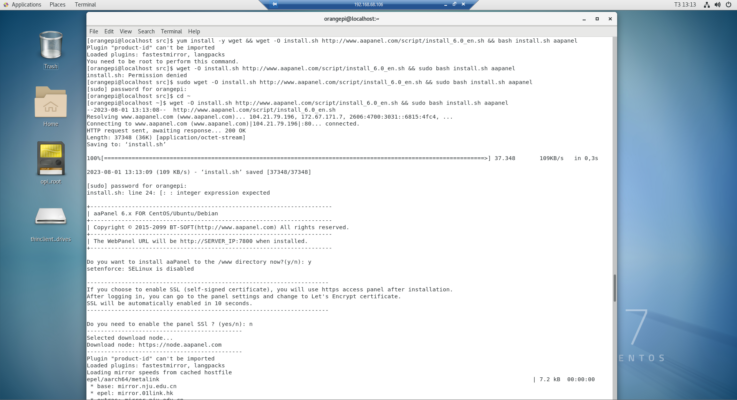
Đối với bản Centos này bạn chỉ cần đơn giản chạy lệnh này là xong
|
||
|
||
`yum install -y wget && wget -O install.sh http://www.aapanel.com/script/install_6.0_en.sh && bash install.sh aapanel`
|
||
|
||
Sau khi quá trình cài dặt kết thúc, bạn vào giao diện web tại http://IP\_của\_PI và hoàn tất quá trình cài đặt
|
||
|
||
[](https://orangepivn.b-cdn.net/wp-content/uploads/2023/08/aapanel-opi5plus.png)
|
||
|
||
Tôi đang có ý định mở cổng internet tại văn phòng, và sử dụng Orange Pi 5 Plus như một webserver host luôn các ứng dụng cần thiết cho Orange Pi, vì thực sự là với cấu hình như vậy Orange Pi 5 Plus vượt xa các gói VPS mà tôi đang sử dụng.
|
||
|
||
[Chia sẻ trên WhatsApp](whatsapp://send?text=C%C3%A0i%20%C4%91%E1%BA%B7t%20Centos%207%20b%E1%BA%A3n%20GNOME%20desktop%20v%C3%A0%20remote%20qua%20RDP%20tr%C3%AAn%20Orange%20Pi%205%20Plus%20-%20https://orangepi.vn/cai-dat-centos-7-ban-gnome-desktop-va-remote-qua-rdp-tren-orange-pi-5-plus.html "Chia sẻ trên WhatsApp")[Chia sẻ trên Facebook](https://www.facebook.com/sharer.php?u=https://orangepi.vn/cai-dat-centos-7-ban-gnome-desktop-va-remote-qua-rdp-tren-orange-pi-5-plus.html "Chia sẻ trên Facebook")[Chia sẻ trên Twitter](https://twitter.com/share?url=https://orangepi.vn/cai-dat-centos-7-ban-gnome-desktop-va-remote-qua-rdp-tren-orange-pi-5-plus.html "Chia sẻ trên Twitter")[Gửi email cho bạn bè](mailto:?subject=C%C3%A0i%20%C4%91%E1%BA%B7t%20Centos%207%20b%E1%BA%A3n%20GNOME%20desktop%20v%C3%A0%20remote%20qua%20RDP%20tr%C3%AAn%20Orange%20Pi%205%20Plus&body=Xem%20n%C3%A0y%3A%20https%3A%2F%2Forangepi.vn%2Fcai-dat-centos-7-ban-gnome-desktop-va-remote-qua-rdp-tren-orange-pi-5-plus.html "Gửi email cho bạn bè")[Ghim trên Pinterest](https://pinterest.com/pin/create/button?url=https://orangepi.vn/cai-dat-centos-7-ban-gnome-desktop-va-remote-qua-rdp-tren-orange-pi-5-plus.html&media=https://orangepi.vn/wp-content/uploads/2023/08/opi5plus-centos.png&description=C%C3%A0i%20%C4%91%E1%BA%B7t%20Centos%207%20b%E1%BA%A3n%20GNOME%20desktop%20v%C3%A0%20remote%20qua%20RDP%20tr%C3%AAn%20Orange%20Pi%205%20Plus "Ghim trên Pinterest")[Chia sẻ trên LinkedIn](https://www.linkedin.com/shareArticle?mini=true&url=https://orangepi.vn/cai-dat-centos-7-ban-gnome-desktop-va-remote-qua-rdp-tren-orange-pi-5-plus.html&title=C%C3%A0i%20%C4%91%E1%BA%B7t%20Centos%207%20b%E1%BA%A3n%20GNOME%20desktop%20v%C3%A0%20remote%20qua%20RDP%20tr%C3%AAn%20Orange%20Pi%205%20Plus "Chia sẻ trên LinkedIn")
|
||
|
||

|
||
|
||
##### superadmin
|
||
|
||
### Để lại một bình luận [Hủy](https://orangepi.vn/cai-dat-centos-7-ban-gnome-desktop-va-remote-qua-rdp-tren-orange-pi-5-plus.html\#respond)
|
||
|
||
Email của bạn sẽ không được hiển thị công khai.Các trường bắt buộc được đánh dấu \*
|
||
|
||
Bình luận \*
|
||
|
||
Tên \*
|
||
|
||
Email \*
|
||
|
||
Trang web
|
||
|
||
Δ
|
||
|
||
- Tìm kiếm:
|
||
|
||
- [Orange Pi Việt Nam](https://orangepi.vn/)
|
||
- [Giới thiệu về máy tính nhúng](https://orangepi.vn/gioi-thieu-ve-may-tinh-nhung)
|
||
- [Hướng dẫn đặt hàng](https://orangepi.vn/dat-hang-tai-orange-pi-viet-nam)
|
||
- [Chính sách Bảo hành](https://orangepi.vn/chinh-sach-ban-hang-va-bao-hanh)
|
||
- [Thư ủy quyền phân phối tại Việt Nam](https://orangepi.vn/thu-uy-quyen-phan-phoi-tai-viet-nam)
|
||
- [Chính sách bảo mật](https://orangepi.vn/chinh-sach-bao-mat)
|
||
- [Liên hệ](https://orangepi.vn/lien-he)
|
||
- [Shop](https://orangepi.vn/shop)
|
||
- [Bo Mạch Orange Pi](https://orangepi.vn/danh-muc-san-pham/bo-mach-orange-pi)
|
||
- [Chip H3](https://orangepi.vn/tu-khoa-san-pham/chip-h3)
|
||
- [Chip H6](https://orangepi.vn/tu-khoa-san-pham/chip-h6)
|
||
- [RK3399](https://orangepi.vn/tu-khoa-san-pham/chip-rk3399)
|
||
- [RK3588, RK3566](https://orangepi.vn/tu-khoa-san-pham/rk3588)
|
||
- [Chip H616, H618](https://orangepi.vn/tu-khoa-san-pham/chip-h616)
|
||
- [Allwinner A733](https://orangepi.vn/tu-khoa-san-pham/allwinner-a733)
|
||
- [RAM 1GB](https://orangepi.vn/tu-khoa-san-pham/ram-1gb)
|
||
- [RAM 2GB](https://orangepi.vn/tu-khoa-san-pham/ram-2gb)
|
||
- [RAM 4GB](https://orangepi.vn/tu-khoa-san-pham/ram-4gb)
|
||
- [RAM 6GB](https://orangepi.vn/tu-khoa-san-pham/ram-6gb)
|
||
- [RAM 8GB](https://orangepi.vn/tu-khoa-san-pham/ram8gb)
|
||
- [Phụ kiện Orange Pi](https://orangepi.vn/danh-muc-san-pham/phu-kien-orange-pi)
|
||
- [Màn hình](https://orangepi.vn/tu-khoa-san-pham/man-hinh)
|
||
- [Vỏ Mica lắp ghép](https://orangepi.vn/tu-khoa-san-pham/vo-mica)
|
||
- [Vỏ thép kiêm tản nhiệt](https://orangepi.vn/tu-khoa-san-pham/vo-thep)
|
||
- [Vỏ nhôm nhẹ tản nhiệt tốt](https://orangepi.vn/tu-khoa-san-pham/vo-nhom)
|
||
- [Nguồn Orange Pi](https://orangepi.vn/tu-khoa-san-pham/nguon-orange-pi)
|
||
- [Thẻ nhớ microSD](https://orangepi.vn/tu-khoa-san-pham/the-nho-microsd)
|
||
- [Compute Module](https://orangepi.vn/tu-khoa-san-pham/compute-module)
|
||
- [Blog](https://orangepi.vn/blog)
|
||
- [Giới thiệu](https://orangepi.vn/category/gioi-thieu)
|
||
- [Hướng dẫn](https://orangepi.vn/category/huong-dan)
|
||
- [Trình diễn](https://orangepi.vn/category/trinh-dien)
|
||
- [Đăng nhập](https://orangepi.vn/my-account "Đăng nhập")
|
||
- [**Hotline: 0923449899**](tel:0923449899)
|
||
|
||
Bạn cần trợ giúp?
|
||
|
||
[Messenger](https://m.me/orangepivietnam "Messenger") [Zalo Official Account](https://oa.zalo.me/1687181280533723118 "Zalo Official Account") [Telegram](https://t.me/maytinhnhung "Telegram") [Whatsapp](https://api.whatsapp.com/send?phone=84923449899 "Whatsapp")
|
||
|
||

|
||
|
||
Orange Pi Việt NamNhà phân phối chính thức
|
||
|
||
Xin chào! 👋🏼👋🏼👋🏼 Tôi có thể giúp gì được bạn?
|
||
|
||
- [Hotline](tel:0923449899 "Hotline")
|
||
- [Facebook](https://www.facebook.com/orangepivietnam "Facebook")
|
||
- [Zalo](https://oa.zalo.me/1687181280533723118 "Zalo")
|
||
|
||
## Đăng nhập
|
||
|
||
Sign In - Google Accounts
|
||
|
||
Continue with GoogleContinue with Google. Opens in new tab
|
||
|
||
Tên tài khoản hoặc địa chỉ email \*Bắt buộc
|
||
|
||
Mật khẩu \*Bắt buộc
|
||
|
||
Ghi nhớ mật khẩuĐăng nhập
|
||
|
||
[Quên mật khẩu?](https://orangepi.vn/my-account/lost-password) |