
231 lines
14 KiB
Markdown
231 lines
14 KiB
Markdown
Sau khi thành công ở việc [lắp đặt phần 1](https://orangepi.vn/cai-dat-bo-chuyen-doi-nhac-so-chat-luong-cao-dac-voi-orange-pi-lite-phan-1.html), tôi sẽ tiếp tục hướng dẫn các bạn cài Squeezelite với giao squeezeslave GUI, và cài luôn Logitech Media Server để chạy luôn Squeezelite trên đó. Lí do sử dụng Squeezelite là bởi vì Orange PI chưa có 1 bản build Volumio hay RuneAudio nào hoàn hảo cho nó cả, nên sử dụng các bản chơi nhạc mã nguồn mở cấp thấp này là cách tận dụng nhanh nhất.
|
||
|
||
**Đầu tiên là Squeezelite**, hiện tại tải về một bản Squeezelite dùng chip ARM là rất khó, may quá tôi tìm được 1 bản clone trên github , có add thêm cả giao diện GUI, quá hoàn hảo
|
||
|
||
Trước tiên quay trở lại thư mục root gốc
|
||
|
||
```
|
||
cd ~
|
||
```
|
||
|
||
Clone mã nguồn về:
|
||
|
||
```
|
||
git clone https://github.com/fpasteau/squeezelite
|
||
```
|
||
|
||
Trong trường hợp HDH chưa cài git, hãy cài trước rồi dùng câu lệnh clone sau
|
||
|
||
Vào thư mục vừa clone về
|
||
|
||
```
|
||
cd squeezelite
|
||
```
|
||
|
||
Và build
|
||
|
||
```
|
||
apt-get install libasound2-dev libflac-dev libmad0-dev libvorbis-dev libfaad-dev libmpg123-dev liblircclient-dev libncurses5-dev
|
||
OPTS=-DINTERACTIVE make
|
||
```
|
||
|
||
Tiếp theo đó, dùng câu lệnh ssau xem Squeezelite chạy với các hardware nào
|
||
|
||
```
|
||
squeezelite -l
|
||
```
|
||
|
||
Kết quả trả về một danh sách các phần cứng, nếu có snddaudio, là chúng ta thành công
|
||
|
||
```
|
||
|
||
Output devices:
|
||
null - Discard all samples (playback) or generate zero samples (capture)
|
||
default:CARD=audiocodec - audiocodec, - Default Audio Device
|
||
sysdefault:CARD=audiocodec - audiocodec, - Default Audio Device
|
||
dmix:CARD=audiocodec,DEV=0 - audiocodec, - Direct sample mixing device
|
||
dsnoop:CARD=audiocodec,DEV=0 - audiocodec, - Direct sample snooping device
|
||
hw:CARD=audiocodec,DEV=0 - audiocodec, - Direct hardware device without any conversions
|
||
plughw:CARD=audiocodec,DEV=0 - audiocodec, - Hardware device with all software conversions
|
||
default:CARD=snddaudio - snddaudio, - Default Audio Device
|
||
sysdefault:CARD=snddaudio - snddaudio, - Default Audio Device
|
||
dmix:CARD=snddaudio,DEV=0 - snddaudio, - Direct sample mixing device
|
||
dsnoop:CARD=snddaudio,DEV=0 - snddaudio, - Direct sample snooping device
|
||
hw:CARD=snddaudio,DEV=0 - snddaudio, - Direct hardware device without any conversions
|
||
plughw:CARD=snddaudio,DEV=0 - snddaudio, - Hardware device with all software conversions
|
||
default:CARD=sndhdmi - sndhdmi, - Default Audio Device
|
||
sysdefault:CARD=sndhdmi - sndhdmi, - Default Audio Device
|
||
dmix:CARD=sndhdmi,DEV=0 - sndhdmi, - Direct sample mixing device
|
||
dsnoop:CARD=sndhdmi,DEV=0 - sndhdmi, - Direct sample snooping device
|
||
hw:CARD=sndhdmi,DEV=0 - sndhdmi, - Direct hardware device without any conversions
|
||
plughw:CARD=sndhdmi,DEV=0 - sndhdmi, - Hardware device with all software conversions
|
||
default:CARD=DAC - USB AUDIO DAC, USB Audio - Default Audio Device
|
||
sysdefault:CARD=DAC - USB AUDIO DAC, USB Audio - Default Audio Device
|
||
front:CARD=DAC,DEV=0 - USB AUDIO DAC, USB Audio - Front speakers
|
||
surround21:CARD=DAC,DEV=0 - USB AUDIO DAC, USB Audio - 2.1 Surround output to Front and Subwoofer speakers
|
||
surround40:CARD=DAC,DEV=0 - USB AUDIO DAC, USB Audio - 4.0 Surround output to Front and Rear speakers
|
||
surround41:CARD=DAC,DEV=0 - USB AUDIO DAC, USB Audio - 4.1 Surround output to Front, Rear and Subwoofer speakers
|
||
surround50:CARD=DAC,DEV=0 - USB AUDIO DAC, USB Audio - 5.0 Surround output to Front, Center and Rear speakers
|
||
surround51:CARD=DAC,DEV=0 - USB AUDIO DAC, USB Audio - 5.1 Surround output to Front, Center, Rear and Subwoofer speakers
|
||
surround71:CARD=DAC,DEV=0 - USB AUDIO DAC, USB Audio - 7.1 Surround output to Front, Center, Side, Rear and Woofer speakers
|
||
iec958:CARD=DAC,DEV=0 - USB AUDIO DAC, USB Audio - IEC958 (S/PDIF) Digital Audio Output
|
||
dmix:CARD=DAC,DEV=0 - USB AUDIO DAC, USB Audio - Direct sample mixing device
|
||
dsnoop:CARD=DAC,DEV=0 - USB AUDIO DAC, USB Audio - Direct sample snooping device
|
||
hw:CARD=DAC,DEV=0 - USB AUDIO DAC, USB Audio - Direct hardware device without any conversions
|
||
plughw:CARD=DAC,DEV=0 - USB AUDIO DAC, USB Audio - Hardware device with all software conversions
|
||
```
|
||
|
||
Tôi chọn chạy với trực tiếp với hardware và không có conversion nào
|
||
|
||
```
|
||
squeezelite -o hw:CARD=snddaudio,DEV=0
|
||
```
|
||
|
||
Squeezelite chỉ là player, và nó cần Server music để nó kết nối chạy, đáng buồn là Squeezelite chỉ hỗ trợ Logitech Media Server, nên ta phải tìm dc bản Logitech Media Server cho ARM đẻ cài. Xem tất cả các bản ở đây
|
||
|
||
[http://downloads.slimdevices.com/nightly/?ver=7.9](http://downloads.slimdevices.com/nightly/?ver=7.9)
|
||
|
||
Phiên bản 7.9 là OK rồi, tải bản cho ARM
|
||
|
||
```
|
||
cd ~
|
||
wget http://downloads.slimdevices.com/nightly/7.9/sc/21d6247f6756178b15a858a51098c8d5ca4e4d95/logitechmediaserver_7.9.1~1521438894_arm.deb
|
||
dpkg -i *
|
||
```
|
||
|
||
Cài xong, kiểm tra xem server chạy chưa
|
||
|
||
```
|
||
|
||
ps -A | grep squeez
|
||
```
|
||
|
||
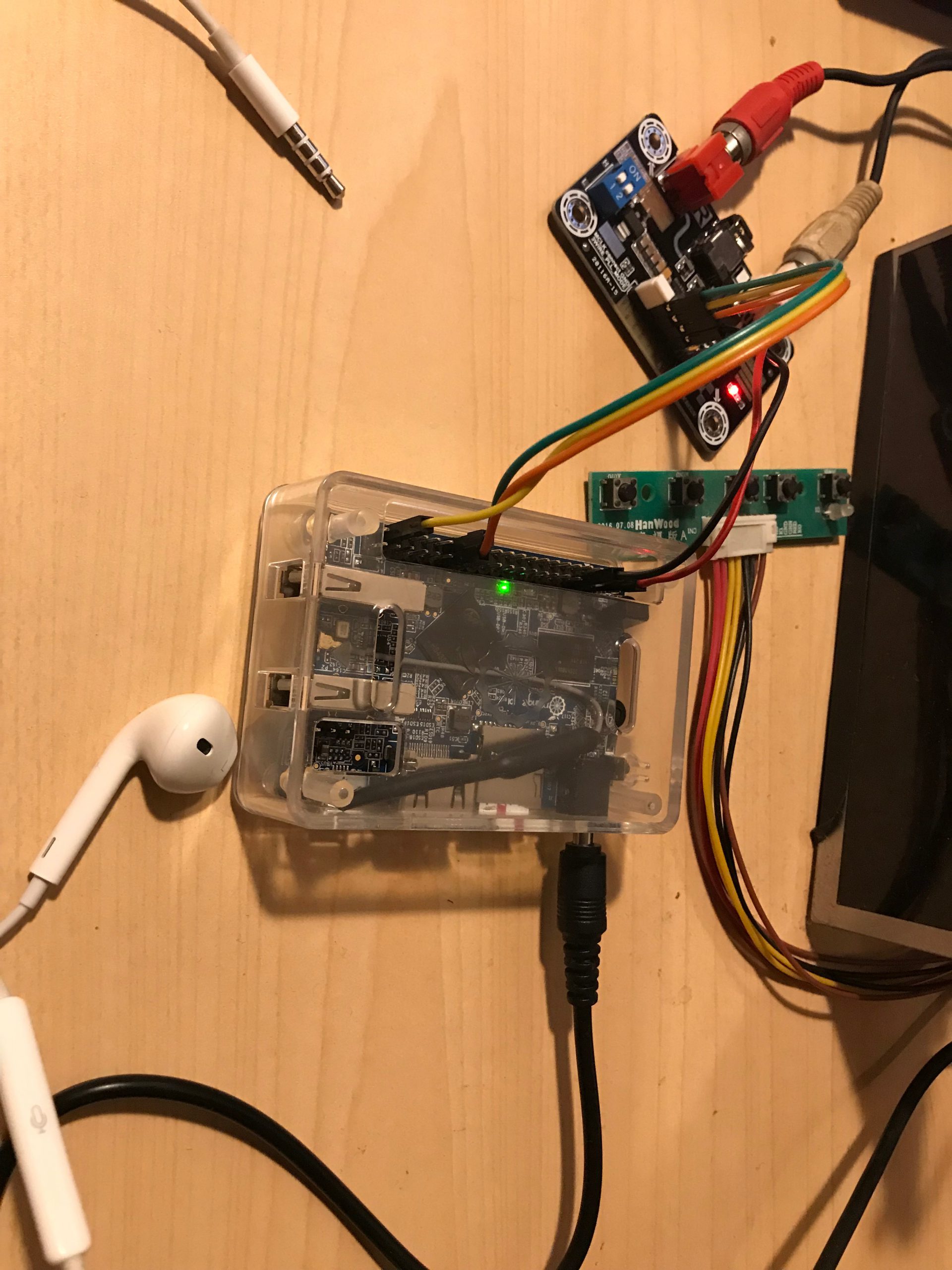Nếu có kết quả thì ứng dụng Logitech Media Server đã chạy, bạn có thể truy cập nó bằng cách vào IP của Orange Pi với cổng 9000, ví dụ: 192.168.1.146:9000
|
||
|
||
Sau khi bỏ qua việc tạo tài khoản Logitech, giao diện sẽ quay về giao diện ban đầu, bạn chọn `squeezelite` trong số player và bắt đầu điều khiển Player chạy. Điểm hơi khác biệt ở đây chút là với giao diện web của Logitech Media Server thì ở đây là server điều khiển client chạy chứ không phải client chạy lấy dữ liệu từ server và chủ động.
|
||
|
||
Để Player biết sẽ chạy từ server nào, thêm thông số vào `squeezelite` và khởi động lại
|
||
|
||
```
|
||
/squeezelite -o hw:CARD=snddaudio,DEV=0 -s 127.0.0.1
|
||
```
|
||
|
||
NẾu bạn căm thêm màn hình vào Orange PI Lite, thì bạn sẽ không thấy gì, muốn chạy giao diện trên PI, bạn thêm tham số -T
|
||
|
||
```
|
||
/squeezelite -T -o hw:CARD=snddaudio,DEV=0 -s 127.0.0.1
|
||
```
|
||
|
||
Ok đã xong. Giờ quay lại giao diện web của Logitech Media Server, chọn nguồn nhạc (NAS, ổ cứng, USB) và ra lệnh cho Player `squeezelite` chơi nhạc, như video sau
|
||
|
||
Orange PI Lite DAC - YouTube
|
||
|
||
Tap to unmute
|
||
|
||
[Orange PI Lite DAC](https://www.youtube.com/watch?v=TrSHFk6UY70) [Orange Pi Vietnam](https://www.youtube.com/channel/UCl0lVmXFHAhZybuOIzu2CaA)
|
||
|
||

|
||
|
||
Orange Pi Vietnam1.83K subscribers
|
||
|
||
[Watch on](https://www.youtube.com/watch?v=TrSHFk6UY70)
|
||
|
||
Bonus một số câu lệnh chạy và khởi động
|
||
|
||
```
|
||
service --status-all
|
||
sudo service logitechmediaserver start
|
||
sudo service logitechmediaserver stop
|
||
```
|
||
|
||
[Chia sẻ trên WhatsApp](whatsapp://send?text=C%C3%A0i%20%C4%91%E1%BA%B7t%20b%E1%BB%99%20chuy%E1%BB%83n%20%C4%91%E1%BB%95i%20nh%E1%BA%A1c%20s%E1%BB%91%20ch%E1%BA%A5t%20l%C6%B0%E1%BB%A3ng%20cao%20%28DAC%29%20v%E1%BB%9Bi%20Orange%20Pi%20Lite%20%28ph%E1%BA%A7n%202%29%20-%20https://orangepi.vn/cai-dat-bo-chuyen-doi-nhac-so-chat-luong-cao-dac-voi-orange-pi-lite-phan-2.html "Chia sẻ trên WhatsApp")[Chia sẻ trên Facebook](https://www.facebook.com/sharer.php?u=https://orangepi.vn/cai-dat-bo-chuyen-doi-nhac-so-chat-luong-cao-dac-voi-orange-pi-lite-phan-2.html "Chia sẻ trên Facebook")[Chia sẻ trên Twitter](https://twitter.com/share?url=https://orangepi.vn/cai-dat-bo-chuyen-doi-nhac-so-chat-luong-cao-dac-voi-orange-pi-lite-phan-2.html "Chia sẻ trên Twitter")[Gửi email cho bạn bè](mailto:?subject=C%C3%A0i%20%C4%91%E1%BA%B7t%20b%E1%BB%99%20chuy%E1%BB%83n%20%C4%91%E1%BB%95i%20nh%E1%BA%A1c%20s%E1%BB%91%20ch%E1%BA%A5t%20l%C6%B0%E1%BB%A3ng%20cao%20%28DAC%29%20v%E1%BB%9Bi%20Orange%20Pi%20Lite%20%28ph%E1%BA%A7n%202%29&body=Xem%20n%C3%A0y%3A%20https%3A%2F%2Forangepi.vn%2Fcai-dat-bo-chuyen-doi-nhac-so-chat-luong-cao-dac-voi-orange-pi-lite-phan-2.html "Gửi email cho bạn bè")[Ghim trên Pinterest](https://pinterest.com/pin/create/button?url=https://orangepi.vn/cai-dat-bo-chuyen-doi-nhac-so-chat-luong-cao-dac-voi-orange-pi-lite-phan-2.html&media=https://orangepi.vn/wp-content/uploads/2018/03/IMG_1407-600x800.jpg&description=C%C3%A0i%20%C4%91%E1%BA%B7t%20b%E1%BB%99%20chuy%E1%BB%83n%20%C4%91%E1%BB%95i%20nh%E1%BA%A1c%20s%E1%BB%91%20ch%E1%BA%A5t%20l%C6%B0%E1%BB%A3ng%20cao%20%28DAC%29%20v%E1%BB%9Bi%20Orange%20Pi%20Lite%20%28ph%E1%BA%A7n%202%29 "Ghim trên Pinterest")[Chia sẻ trên LinkedIn](https://www.linkedin.com/shareArticle?mini=true&url=https://orangepi.vn/cai-dat-bo-chuyen-doi-nhac-so-chat-luong-cao-dac-voi-orange-pi-lite-phan-2.html&title=C%C3%A0i%20%C4%91%E1%BA%B7t%20b%E1%BB%99%20chuy%E1%BB%83n%20%C4%91%E1%BB%95i%20nh%E1%BA%A1c%20s%E1%BB%91%20ch%E1%BA%A5t%20l%C6%B0%E1%BB%A3ng%20cao%20%28DAC%29%20v%E1%BB%9Bi%20Orange%20Pi%20Lite%20%28ph%E1%BA%A7n%202%29 "Chia sẻ trên LinkedIn")
|
||
|
||

|
||
|
||
##### superadmin
|
||
|
||
### 2 bình luận về “Cài đặt bộ chuyển đổi nhạc số chất lượng cao (DAC) với Orange Pi Lite (phần 2)”
|
||
|
||
1. Pingback: [Cài đặt bộ chuyển đổi nhạc số chất lượng cao (DAC) với Orange Pi Lite (phần 1) - OrangePI.me](https://orangepi.vn/cai-dat-bo-chuyen-doi-nhac-so-chat-luong-cao-dac-voi-orange-pi-lite-phan-1.html)
|
||
|
||
2. Pingback: [Cài đặt bộ chuyển đổi nhạc số chất lượng cao (DAC) với Orange Pi Lite (phần 1) - Orange Pi Viet Nam](https://orangepi.vn/cai-dat-bo-chuyen-doi-nhac-so-chat-luong-cao-dac-voi-orange-pi-lite-phan-1.html)
|
||
|
||
|
||
### Để lại một bình luận [Hủy](https://orangepi.vn/cai-dat-bo-chuyen-doi-nhac-so-chat-luong-cao-dac-voi-orange-pi-lite-phan-2.html\#respond)
|
||
|
||
Email của bạn sẽ không được hiển thị công khai.Các trường bắt buộc được đánh dấu \*
|
||
|
||
Bình luận \*
|
||
|
||
Tên \*
|
||
|
||
Email \*
|
||
|
||
Trang web
|
||
|
||
Δ
|
||
|
||
- Tìm kiếm:
|
||
|
||
- [Orange Pi Việt Nam](https://orangepi.vn/)
|
||
- [Giới thiệu về máy tính nhúng](https://orangepi.vn/gioi-thieu-ve-may-tinh-nhung)
|
||
- [Hướng dẫn đặt hàng](https://orangepi.vn/dat-hang-tai-orange-pi-viet-nam)
|
||
- [Chính sách Bảo hành](https://orangepi.vn/chinh-sach-ban-hang-va-bao-hanh)
|
||
- [Thư ủy quyền phân phối tại Việt Nam](https://orangepi.vn/thu-uy-quyen-phan-phoi-tai-viet-nam)
|
||
- [Chính sách bảo mật](https://orangepi.vn/chinh-sach-bao-mat)
|
||
- [Liên hệ](https://orangepi.vn/lien-he)
|
||
- [Shop](https://orangepi.vn/shop)
|
||
- [Bo Mạch Orange Pi](https://orangepi.vn/danh-muc-san-pham/bo-mach-orange-pi)
|
||
- [Chip H3](https://orangepi.vn/tu-khoa-san-pham/chip-h3)
|
||
- [Chip H6](https://orangepi.vn/tu-khoa-san-pham/chip-h6)
|
||
- [RK3399](https://orangepi.vn/tu-khoa-san-pham/chip-rk3399)
|
||
- [RK3588, RK3566](https://orangepi.vn/tu-khoa-san-pham/rk3588)
|
||
- [Chip H616, H618](https://orangepi.vn/tu-khoa-san-pham/chip-h616)
|
||
- [Allwinner A733](https://orangepi.vn/tu-khoa-san-pham/allwinner-a733)
|
||
- [RAM 1GB](https://orangepi.vn/tu-khoa-san-pham/ram-1gb)
|
||
- [RAM 2GB](https://orangepi.vn/tu-khoa-san-pham/ram-2gb)
|
||
- [RAM 4GB](https://orangepi.vn/tu-khoa-san-pham/ram-4gb)
|
||
- [RAM 6GB](https://orangepi.vn/tu-khoa-san-pham/ram-6gb)
|
||
- [RAM 8GB](https://orangepi.vn/tu-khoa-san-pham/ram8gb)
|
||
- [Phụ kiện Orange Pi](https://orangepi.vn/danh-muc-san-pham/phu-kien-orange-pi)
|
||
- [Màn hình](https://orangepi.vn/tu-khoa-san-pham/man-hinh)
|
||
- [Vỏ Mica lắp ghép](https://orangepi.vn/tu-khoa-san-pham/vo-mica)
|
||
- [Vỏ thép kiêm tản nhiệt](https://orangepi.vn/tu-khoa-san-pham/vo-thep)
|
||
- [Vỏ nhôm nhẹ tản nhiệt tốt](https://orangepi.vn/tu-khoa-san-pham/vo-nhom)
|
||
- [Nguồn Orange Pi](https://orangepi.vn/tu-khoa-san-pham/nguon-orange-pi)
|
||
- [Thẻ nhớ microSD](https://orangepi.vn/tu-khoa-san-pham/the-nho-microsd)
|
||
- [Compute Module](https://orangepi.vn/tu-khoa-san-pham/compute-module)
|
||
- [Blog](https://orangepi.vn/blog)
|
||
- [Giới thiệu](https://orangepi.vn/category/gioi-thieu)
|
||
- [Hướng dẫn](https://orangepi.vn/category/huong-dan)
|
||
- [Trình diễn](https://orangepi.vn/category/trinh-dien)
|
||
- [Đăng nhập](https://orangepi.vn/my-account "Đăng nhập")
|
||
- [**Hotline: 0923449899**](tel:0923449899)
|
||
|
||
Bạn cần trợ giúp?
|
||
|
||
[Messenger](https://m.me/orangepivietnam "Messenger") [Zalo Official Account](https://oa.zalo.me/1687181280533723118 "Zalo Official Account") [Telegram](https://t.me/maytinhnhung "Telegram") [Whatsapp](https://api.whatsapp.com/send?phone=84923449899 "Whatsapp")
|
||
|
||

|
||
|
||
Orange Pi Việt NamNhà phân phối chính thức
|
||
|
||
Xin chào! 👋🏼👋🏼👋🏼 Tôi có thể giúp gì được bạn?
|
||
|
||
- [Hotline](tel:0923449899 "Hotline")
|
||
- [Facebook](https://www.facebook.com/orangepivietnam "Facebook")
|
||
- [Zalo](https://oa.zalo.me/1687181280533723118 "Zalo")
|
||
|
||
## Đăng nhập
|
||
|
||
Sign In - Google Accounts
|
||
|
||
Continue with GoogleContinue with Google. Opens in new tab
|
||
|
||
Tên tài khoản hoặc địa chỉ email \*Bắt buộc
|
||
|
||
Mật khẩu \*Bắt buộc
|
||
|
||
Ghi nhớ mật khẩuĐăng nhập
|
||
|
||
[Quên mật khẩu?](https://orangepi.vn/my-account/lost-password) |