
72 lines
18 KiB
JSON
72 lines
18 KiB
JSON
{
|
||
"success": true,
|
||
"data": {
|
||
"markdown": "[Bỏ qua nội dung](https://orangepi.vn/series-bai-viet-ve-cac-phan-mem-giam-sat-video-mien-phi-ma-nguon-mo-phan-3.html#main)\n\nNhư ở phần 1 đã đề cập – [Series bài viết về các phần mềm giám sát video miễn phí, mã nguồn mở (phần 1)](https://orangepi.vn/series-bai-viet-ve-cac-phan-mem-giam-sat-video-mien-phi-ma-nguon-mo-phan-1.html) – Frigate và MotionEye đều là những phần mềm giám sát video đơn giản có thể cài được dễ dàng trên [Orange Pi](https://orangepi.net/). Bài trước tôi đã [hướng dẫn cài Frigate](https://orangepi.vn/series-bai-viet-ve-cac-phan-mem-giam-sat-video-mien-phi-ma-nguon-mo-phan-2.html), bài này với MotionEye, thực sự mọi thứ còn dễ dàng hơn nhiều.\n\n## **Giới thiệu về MotionEye**\n\n[MotionEye](https://orangepi.vn/series-bai-viet-ve-cac-phan-mem-giam-sat-video-mien-phi-ma-nguon-mo-phan-3.html) là một hệ thống giám sát camera mã nguồn mở được phát triển trên nền tảng Motion. Nó cung cấp giao diện web dễ sử dụng, cho phép người dùng quản lý nhiều camera, xem video trực tiếp, lưu trữ bản ghi, và phát hiện chuyển động.\n\n### **Các tính năng chính của MotionEye**\n\n1. **Quản lý nhiều camera:** Hỗ trợ nhiều loại camera như USB, IP camera (RTSP, HTTP), và Pi camera.\n2. **Phát hiện chuyển động:** Tự động ghi hình hoặc chụp ảnh khi phát hiện chuyển động.\n3. **Lưu trữ và quản lý bản ghi:** Có thể lưu video và ảnh vào bộ nhớ nội bộ hoặc dịch vụ lưu trữ đám mây như Google Drive, Dropbox.\n4. **Cảnh báo:** Gửi email hoặc thông báo khi phát hiện chuyển động.\n5. **Tích hợp giao diện web:** Quản lý và cấu hình thông qua trình duyệt mà không cần phần mềm cài thêm.\n6. **Hỗ trợ tùy chỉnh:** Cài đặt nâng cao như độ phân giải, khung hình, vùng phát hiện chuyển động.\n\n### **Cách cài đặt MotionEye trên Docker (Orange Pi)**\n\n#### **Bước 1: Cài đặt Docker trên Orange Pi**\n\n1. Cập nhật hệ thống:\n\n\n\n`sudo apt update && sudo apt upgrade -y\n\n`\n\n2. Cài đặt Docker: bài trước là cách cài tự động qua docker.io, có thể cách đấy không thành công, bạn hãy dùng cách cài chi tiết này\n\n\n\n`# Add Docker's official GPG key:`\n\n\n\n`sudo apt-get update sudo apt-get install ca-certificates curl`\n\n\n\n`sudo install -m 0755 -d /etc/apt/keyrings`\n\n\n\n`sudo curl -fsSL https://download.docker.com/linux/ubuntu/gpg -o /etc/apt/keyrings/docker.asc`\n\n\n\n`sudo chmod a+r /etc/apt/keyrings/docker.asc`\n\n\n\n`# Add the repository to Apt sources:`\n\n\n\n`echo \\ \"deb [arch=$(dpkg --print-architecture) signed-by=/etc/apt/keyrings/docker.asc] https://download.docker.com/linux/ubuntu \\ $(. /etc/os-release && echo \"$VERSION_CODENAME\") stable\" | \\ sudo tee /etc/apt/sources.list.d/docker.list > /dev/null`\n\n\n\n`sudo apt-get update sudo apt-get install docker-ce docker-ce-cli containerd.io docker-buildx-plugin docker-compose-plugin`\n\n\n\n`#Add current user to docker group`\n\n\n\n`sudo usermod -aG docker $USER\n\nsudo systemctl enable --now docker\n\n`\n\n\n#### **Bước 2: Kéo image MotionEye về máy**\n\n1. Tải xuống image Docker: Đối với Orange Pi 5 (kiến trúc ARM64), bạn cần đảm bảo chọn đúng image nếu không sẽ không chạy, vì thế tôi đã build riêng một image cho Orange Pi 5 dưới kiến trúc ARM64 để các bạn lấy về thoải mái\n\n\n\n`# Image gốc của tác giả`\n\n\n\n`docker pull ccrisan/motioneye:master-armhf`\n\n\n\n`# Image tôi build\n\n`\n\n\n\n`docker pull thanhtantran/motioneye:arm64`\n\n\n#### **Bước 3: Tạo thư mục cấu hình và dữ liệu**\n\n1. Tạo thư mục để lưu cấu hình và dữ liệu:\n\n\n\n`mkdir -p ~/motioneye/config ~/motioneye/media\n\n`\n\n\n#### **Bước 4: Chạy container MotionEye**\n\n1. Chạy container:\n\n\n\n`docker run -d \\\n\n --name=motioneye \\\n\n -p 8765:8765 \\\n\n -v ~/motioneye/config:/etc/motioneye \\\n\n -v ~/motioneye/media:/var/lib/motioneye \\\n\n --restart=always \\\n\nthanhtantran/motioneye:arm64\n\n`\n\n\n\ntrong đó\n\n\n - **`-p 8765:8765`**: Mở cổng 8765 để truy cập giao diện MotionEye.\n - **`-v ~/motioneye/config:/etc/motioneye`**: Thư mục cấu hình.\n - **`-v ~/motioneye/media:/var/lib/motioneye`**: Thư mục lưu trữ dữ liệu (video, ảnh).\n\n#### **Bước 5: Truy cập giao diện web**\n\n1. Mở trình duyệt, nhập địa chỉ: `http://<địa chỉ IP của Orange Pi>:8765\n\n`\n2. Đăng nhập mặc định:\n - **Tên người dùng:**`admin`\n - **Mật khẩu:** (để trống)\n - Đổi mật khẩu ngay lần đăng nhập đầu tiên để bảo mật.\n\n* * *\n\n### **Hướng dẫn sử dụng MotionEye**\n\n1. **Thêm camera:**\n - Truy cập mục _Add Camera_.\n - Chọn loại camera (Local, Network Camera, hoặc URL).\n - Cấu hình camera theo thông số (địa chỉ RTSP, HTTP, hoặc đường dẫn video).\n2. **Cài đặt vùng phát hiện chuyển động:**\n - Vào menu camera, chọn _Motion Detection_.\n - Cấu hình vùng phát hiện và độ nhạy.\n3. **Lưu trữ bản ghi:**\n - Truy cập _File Storage_.\n - Chọn vị trí lưu trữ (bộ nhớ cục bộ hoặc đám mây).\n4. **Cài đặt thông báo:**\n - Cấu hình _Notifications_ để gửi email khi phát hiện chuyển động.\n5. **Quản lý từ xa:**\n - Truy cập giao diện web từ bất kỳ thiết bị nào trên cùng mạng.\n\n[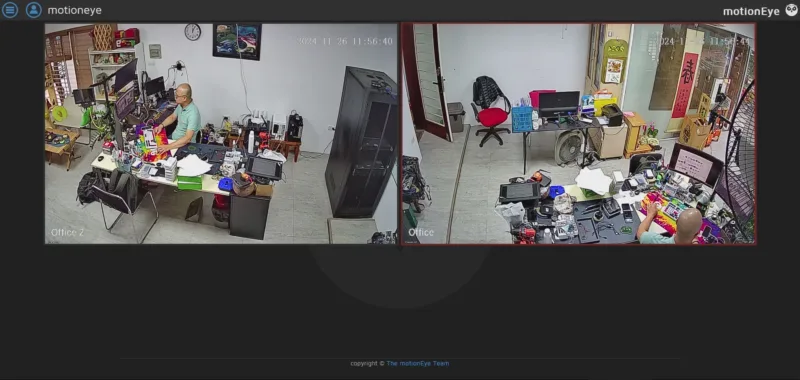](https://orangepivn.b-cdn.net/wp-content/uploads/2024/11/motioneye-1.webp)\n\n[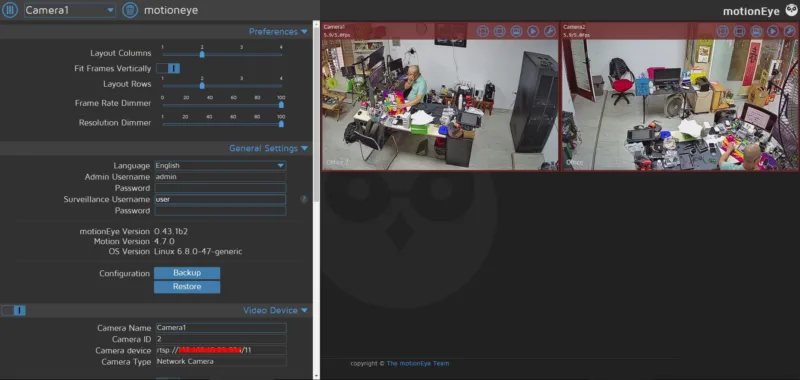](https://orangepivn.b-cdn.net/wp-content/uploads/2024/11/motioneye-2.webp)\n\n[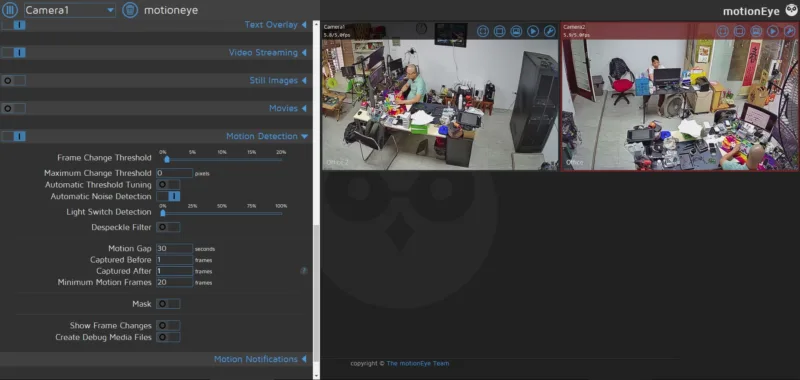](https://orangepivn.b-cdn.net/wp-content/uploads/2024/11/motioneye-3.webp)\n\n[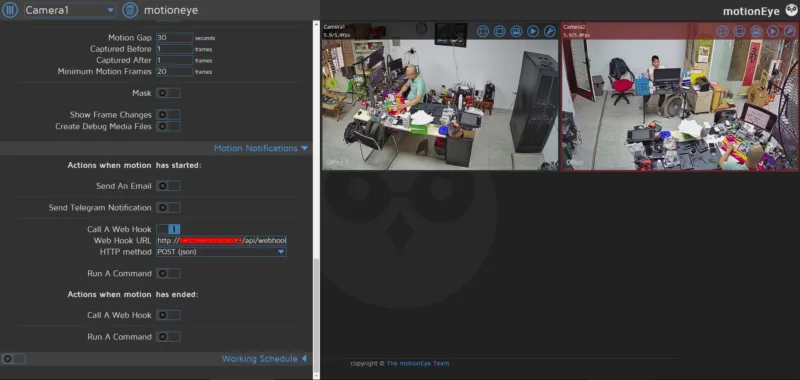](https://orangepivn.b-cdn.net/wp-content/uploads/2024/11/motioneye-4.webp)\n\n### Kết luận\n\nSử dụng [MotionEye trên Orange Pi 5](https://orangepi.vn/series-bai-viet-ve-cac-phan-mem-giam-sat-video-mien-phi-ma-nguon-mo-phan-3.html) đơn giản hơn, thêm camera dễ dàng và có thể nhận dạng motion nhanh chóng, cảnh báo motion qua email, telegram và các phương thức khác. MotionEye phù hợp với sử dụng trong cửa hàng, hộ gia đình hoặc nhà đơn lẻ.\n\n**Các phần trước**\n\n[_Phần 1: Giới thiệu về phần mềm giám sát video miễn phí, mã nguồn mở_](https://orangepi.vn/series-bai-viet-ve-cac-phan-mem-giam-sat-video-mien-phi-ma-nguon-mo-phan-1.html)\n\n_[Phần 2: Cài đặt Frigate trên Orange Pi](https://orangepi.vn/series-bai-viet-ve-cac-phan-mem-giam-sat-video-mien-phi-ma-nguon-mo-phan-2.html)_\n\n**Phần tiếp sau**\n\n[_Phần 4: Cài đặt Shinobi trên Orange Pi_](https://orangepi.vn/series-bai-viet-ve-cac-phan-mem-giam-sat-video-mien-phi-ma-nguon-mo-phan-4.html)\n\n[Chia sẻ trên WhatsApp](whatsapp://send?text=Series%20b%C3%A0i%20vi%E1%BA%BFt%20v%E1%BB%81%20c%C3%A1c%20ph%E1%BA%A7n%20m%E1%BB%81m%20gi%C3%A1m%20s%C3%A1t%20video%20mi%E1%BB%85n%20ph%C3%AD%2C%20m%C3%A3%20ngu%E1%BB%93n%20m%E1%BB%9F%20%28ph%E1%BA%A7n%203%29%20-%20https://orangepi.vn/series-bai-viet-ve-cac-phan-mem-giam-sat-video-mien-phi-ma-nguon-mo-phan-3.html \"Chia sẻ trên WhatsApp\")[Chia sẻ trên Facebook](https://www.facebook.com/sharer.php?u=https://orangepi.vn/series-bai-viet-ve-cac-phan-mem-giam-sat-video-mien-phi-ma-nguon-mo-phan-3.html \"Chia sẻ trên Facebook\")[Chia sẻ trên Twitter](https://twitter.com/share?url=https://orangepi.vn/series-bai-viet-ve-cac-phan-mem-giam-sat-video-mien-phi-ma-nguon-mo-phan-3.html \"Chia sẻ trên Twitter\")[Gửi email cho bạn bè](mailto:?subject=Series%20b%C3%A0i%20vi%E1%BA%BFt%20v%E1%BB%81%20c%C3%A1c%20ph%E1%BA%A7n%20m%E1%BB%81m%20gi%C3%A1m%20s%C3%A1t%20video%20mi%E1%BB%85n%20ph%C3%AD%2C%20m%C3%A3%20ngu%E1%BB%93n%20m%E1%BB%9F%20%28ph%E1%BA%A7n%203%29&body=Xem%20n%C3%A0y%3A%20https%3A%2F%2Forangepi.vn%2Fseries-bai-viet-ve-cac-phan-mem-giam-sat-video-mien-phi-ma-nguon-mo-phan-3.html \"Gửi email cho bạn bè\")[Ghim trên Pinterest](https://pinterest.com/pin/create/button?url=https://orangepi.vn/series-bai-viet-ve-cac-phan-mem-giam-sat-video-mien-phi-ma-nguon-mo-phan-3.html&media=https://orangepi.vn/wp-content/uploads/2024/11/Leonardo_Phoenix_A_modern_illustration_of_an_Orange_Pi_singleb_2.webp&description=Series%20b%C3%A0i%20vi%E1%BA%BFt%20v%E1%BB%81%20c%C3%A1c%20ph%E1%BA%A7n%20m%E1%BB%81m%20gi%C3%A1m%20s%C3%A1t%20video%20mi%E1%BB%85n%20ph%C3%AD%2C%20m%C3%A3%20ngu%E1%BB%93n%20m%E1%BB%9F%20%28ph%E1%BA%A7n%203%29 \"Ghim trên Pinterest\")[Chia sẻ trên LinkedIn](https://www.linkedin.com/shareArticle?mini=true&url=https://orangepi.vn/series-bai-viet-ve-cac-phan-mem-giam-sat-video-mien-phi-ma-nguon-mo-phan-3.html&title=Series%20b%C3%A0i%20vi%E1%BA%BFt%20v%E1%BB%81%20c%C3%A1c%20ph%E1%BA%A7n%20m%E1%BB%81m%20gi%C3%A1m%20s%C3%A1t%20video%20mi%E1%BB%85n%20ph%C3%AD%2C%20m%C3%A3%20ngu%E1%BB%93n%20m%E1%BB%9F%20%28ph%E1%BA%A7n%203%29 \"Chia sẻ trên LinkedIn\")\n\n\n\n##### superadmin\n\n### Để lại một bình luận [Hủy](https://orangepi.vn/series-bai-viet-ve-cac-phan-mem-giam-sat-video-mien-phi-ma-nguon-mo-phan-3.html\\#respond)\n\nEmail của bạn sẽ không được hiển thị công khai.Các trường bắt buộc được đánh dấu \\*\n\nBình luận \\*\n\nTên \\*\n\nEmail \\*\n\nTrang web\n\nΔ\n\n- Tìm kiếm:\n\n- [Orange Pi Việt Nam](https://orangepi.vn/)\n - [Giới thiệu về máy tính nhúng](https://orangepi.vn/gioi-thieu-ve-may-tinh-nhung)\n - [Hướng dẫn đặt hàng](https://orangepi.vn/dat-hang-tai-orange-pi-viet-nam)\n - [Chính sách Bảo hành](https://orangepi.vn/chinh-sach-ban-hang-va-bao-hanh)\n - [Thư ủy quyền phân phối tại Việt Nam](https://orangepi.vn/thu-uy-quyen-phan-phoi-tai-viet-nam)\n - [Chính sách bảo mật](https://orangepi.vn/chinh-sach-bao-mat)\n - [Liên hệ](https://orangepi.vn/lien-he)\n- [Shop](https://orangepi.vn/shop)\n - [Bo Mạch Orange Pi](https://orangepi.vn/danh-muc-san-pham/bo-mach-orange-pi)\n - [Chip H3](https://orangepi.vn/tu-khoa-san-pham/chip-h3)\n - [Chip H6](https://orangepi.vn/tu-khoa-san-pham/chip-h6)\n - [RK3399](https://orangepi.vn/tu-khoa-san-pham/chip-rk3399)\n - [RK3588, RK3566](https://orangepi.vn/tu-khoa-san-pham/rk3588)\n - [Chip H616, H618](https://orangepi.vn/tu-khoa-san-pham/chip-h616)\n - [Allwinner A733](https://orangepi.vn/tu-khoa-san-pham/allwinner-a733)\n - [RAM 1GB](https://orangepi.vn/tu-khoa-san-pham/ram-1gb)\n - [RAM 2GB](https://orangepi.vn/tu-khoa-san-pham/ram-2gb)\n - [RAM 4GB](https://orangepi.vn/tu-khoa-san-pham/ram-4gb)\n - [RAM 6GB](https://orangepi.vn/tu-khoa-san-pham/ram-6gb)\n - [RAM 8GB](https://orangepi.vn/tu-khoa-san-pham/ram8gb)\n - [Phụ kiện Orange Pi](https://orangepi.vn/danh-muc-san-pham/phu-kien-orange-pi)\n - [Màn hình](https://orangepi.vn/tu-khoa-san-pham/man-hinh)\n - [Vỏ Mica lắp ghép](https://orangepi.vn/tu-khoa-san-pham/vo-mica)\n - [Vỏ thép kiêm tản nhiệt](https://orangepi.vn/tu-khoa-san-pham/vo-thep)\n - [Vỏ nhôm nhẹ tản nhiệt tốt](https://orangepi.vn/tu-khoa-san-pham/vo-nhom)\n - [Nguồn Orange Pi](https://orangepi.vn/tu-khoa-san-pham/nguon-orange-pi)\n - [Thẻ nhớ microSD](https://orangepi.vn/tu-khoa-san-pham/the-nho-microsd)\n - [Compute Module](https://orangepi.vn/tu-khoa-san-pham/compute-module)\n- [Blog](https://orangepi.vn/blog)\n - [Giới thiệu](https://orangepi.vn/category/gioi-thieu)\n - [Hướng dẫn](https://orangepi.vn/category/huong-dan)\n - [Trình diễn](https://orangepi.vn/category/trinh-dien)\n- [Đăng nhập](https://orangepi.vn/my-account \"Đăng nhập\")\n- [**Hotline: 0923449899**](tel:0923449899)\n\nBạn cần trợ giúp?\n\n[Messenger](https://m.me/orangepivietnam \"Messenger\") [Zalo Official Account](https://oa.zalo.me/1687181280533723118 \"Zalo Official Account\") [Telegram](https://t.me/maytinhnhung \"Telegram\") [Whatsapp](https://api.whatsapp.com/send?phone=84923449899 \"Whatsapp\")\n\n\n\nOrange Pi Việt NamNhà phân phối chính thức\n\nXin chào! 👋🏼👋🏼👋🏼 Tôi có thể giúp gì được bạn?\n\n- [Hotline](tel:0923449899 \"Hotline\")\n- [Facebook](https://www.facebook.com/orangepivietnam \"Facebook\")\n- [Zalo](https://oa.zalo.me/1687181280533723118 \"Zalo\")\n\n## Đăng nhập\n\nSign In - Google Accounts\n\nContinue with GoogleContinue with Google. Opens in new tab\n\nTên tài khoản hoặc địa chỉ email \\*Bắt buộc\n\nMật khẩu \\*Bắt buộc\n\nGhi nhớ mật khẩuĐăng nhập\n\n[Quên mật khẩu?](https://orangepi.vn/my-account/lost-password)",
|
||
"metadata": {
|
||
"publishedTime": "2024-11-27T08:50:13+00:00",
|
||
"og:image": "https://orangepivn.b-cdn.net/wp-content/uploads/2024/11/Leonardo_Phoenix_A_modern_illustration_of_an_Orange_Pi_singleb_2.webp",
|
||
"ogDescription": "Đây là trang Series bài viết về các phần mềm giám sát video miễn phí, mã nguồn mở (phần 3) của Orange Pi Viet Nam là nhà phân phối chính thức của Orange Pi tại Việt Nam, chuyên cung cấp máy tính nhúng cho dự án, nghiên cứu, hợp tác, phát triển sản phẩm.",
|
||
"language": "vi",
|
||
"robots": "index, follow, max-image-preview:large, max-snippet:-1, max-video-preview:-1",
|
||
"twitter:card": "summary_large_image",
|
||
"twitter:creator": "@orangepi_me",
|
||
"author": "superadmin",
|
||
"msapplication-TileImage": "https://orangepivn.b-cdn.net/wp-content/uploads/2025/01/cropped-fb-logo-big-png-270x270.webp",
|
||
"twitter:label2": "Ước tính thời gian đọc",
|
||
"referrer": [
|
||
"no-referrer",
|
||
"origin"
|
||
],
|
||
"twitter:data1": "superadmin",
|
||
"generator": [
|
||
"dominant-color-images 1.2.1",
|
||
"Site Kit by Google 1.180.0",
|
||
"webp-uploads 2.6.1"
|
||
],
|
||
"twitter:site": "@orangepi_me",
|
||
"og:image:type": "image/jpeg",
|
||
"og:url": "https://orangepi.vn/series-bai-viet-ve-cac-phan-mem-giam-sat-video-mien-phi-ma-nguon-mo-phan-3.html",
|
||
"google-site-verification": "aChCo9My21XgiT2Vte3H89FgebzV7TIv4Ol3OkXaIFU",
|
||
"article:published_time": "2024-11-27T08:50:13+00:00",
|
||
"ogTitle": "Series bài viết về các phần mềm giám sát video miễn phí, mã nguồn mở (phần 3) - Orange Pi Viet Nam",
|
||
"og:locale": "vi_VN",
|
||
"og:site_name": "Orange Pi Viet Nam",
|
||
"ogSiteName": "Orange Pi Viet Nam",
|
||
"og:type": "article",
|
||
"og:title": "Series bài viết về các phần mềm giám sát video miễn phí, mã nguồn mở (phần 3) - Orange Pi Viet Nam",
|
||
"og:image:height": "768",
|
||
"twitter:data2": "5 phút",
|
||
"twitter:label1": "Được viết bởi",
|
||
"title": "Series bài viết về các phần mềm giám sát video miễn phí, mã nguồn mở (phần 3) - Orange Pi Viet Nam",
|
||
"og:description": "Đây là trang Series bài viết về các phần mềm giám sát video miễn phí, mã nguồn mở (phần 3) của Orange Pi Viet Nam là nhà phân phối chính thức của Orange Pi tại Việt Nam, chuyên cung cấp máy tính nhúng cho dự án, nghiên cứu, hợp tác, phát triển sản phẩm.",
|
||
"ogImage": "https://orangepivn.b-cdn.net/wp-content/uploads/2024/11/Leonardo_Phoenix_A_modern_illustration_of_an_Orange_Pi_singleb_2.webp",
|
||
"og:image:width": "1376",
|
||
"ogUrl": "https://orangepi.vn/series-bai-viet-ve-cac-phan-mem-giam-sat-video-mien-phi-ma-nguon-mo-phan-3.html",
|
||
"modifiedTime": "2025-03-10T08:37:47+00:00",
|
||
"article:modified_time": "2025-03-10T08:37:47+00:00",
|
||
"ogLocale": "vi_VN",
|
||
"article:publisher": "https://www.facebook.com/orangepivietnam/",
|
||
"viewport": [
|
||
"width=device-width, initial-scale=1",
|
||
"width=device-width, initial-scale=1.0",
|
||
"initial-scale=1,minimum-scale=1,maximum-scale=1,user-scalable=no"
|
||
],
|
||
"description": "Đây là trang Series bài viết về các phần mềm giám sát video miễn phí, mã nguồn mở (phần 3) của Orange Pi Viet Nam là nhà phân phối chính thức của Orange Pi tại Việt Nam, chuyên cung cấp máy tính nhúng cho dự án, nghiên cứu, hợp tác, phát triển sản phẩm.",
|
||
"favicon": "https://orangepivn.b-cdn.net/wp-content/uploads/2025/01/cropped-fb-logo-big-png-32x32.webp",
|
||
"scrapeId": "019eb219-8dd6-704f-9c26-325a1a7ef8af",
|
||
"sourceURL": "https://orangepi.vn/series-bai-viet-ve-cac-phan-mem-giam-sat-video-mien-phi-ma-nguon-mo-phan-3.html",
|
||
"url": "https://orangepi.vn/series-bai-viet-ve-cac-phan-mem-giam-sat-video-mien-phi-ma-nguon-mo-phan-3.html",
|
||
"statusCode": 200,
|
||
"contentType": "text/html; charset=UTF-8",
|
||
"timezone": "America/New_York",
|
||
"proxyUsed": "basic",
|
||
"cacheState": "miss",
|
||
"indexId": "94201751-faa1-4f97-b39e-7b401019e217",
|
||
"creditsUsed": 1,
|
||
"concurrencyLimited": false
|
||
}
|
||
},
|
||
"_http_status": 200,
|
||
"_source_url": "https://orangepi.vn/series-bai-viet-ve-cac-phan-mem-giam-sat-video-mien-phi-ma-nguon-mo-phan-3.html",
|
||
"_scraped_at": "2026-06-10T15:14:44.682831+00:00"
|
||
} |